
Heat pump control that learns from every installation
A touchscreen tablet runs the whole installation: heat pump, variable-speed compressor, zones, tanks, domestic hot water, swimming pool, back-up heating and solar energy. Its on-board artificial intelligence learns every night how the house really behaves, to fine-tune the control. With synapsus connect, the installation can be monitored and adjusted remotely.
See everything at a glance, adjust everything at a touch
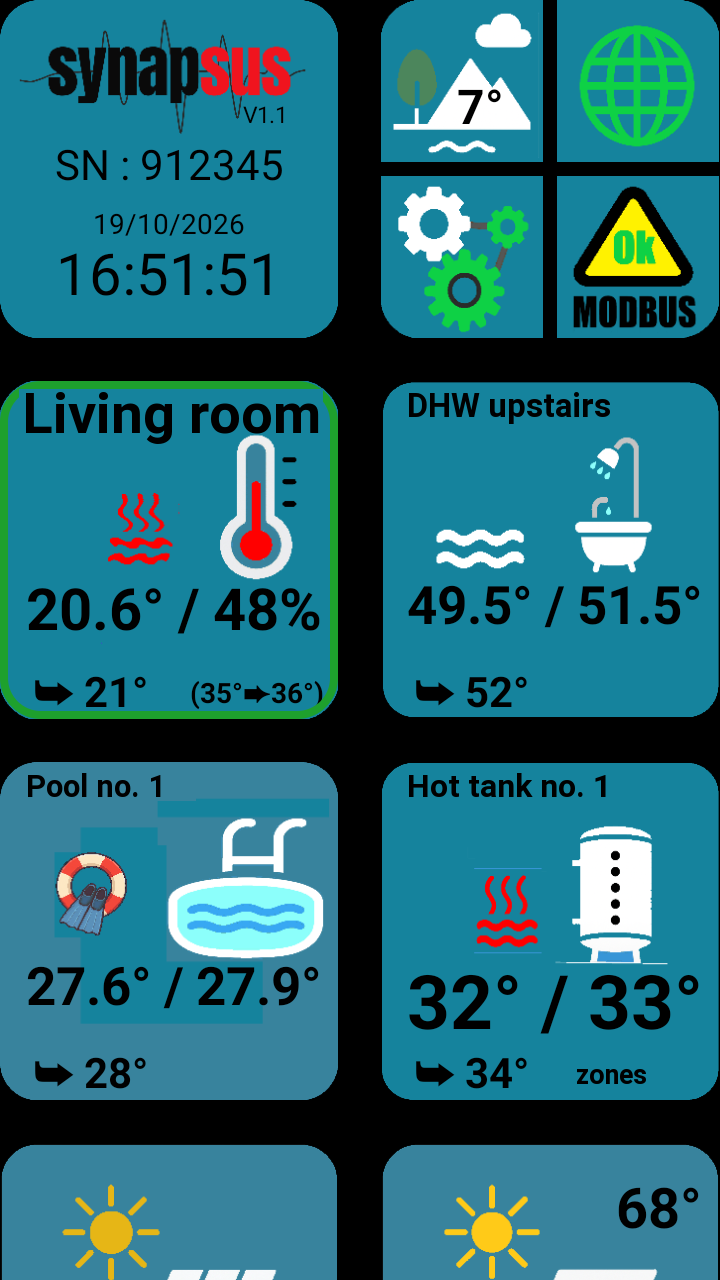
The home screen shows the state of each function in real time: measured temperature, setpoint, function running (animated green border), alarm (red), function disabled (grey).
- Heating and cooling zones: heating and cooling room by room or floor by floor, with room sensor and heating curve.
- Hot and cold tanks, domestic hot water, swimming pool: each with its own setpoints, schedule and priorities.
- Support: back-up heating (electric heater, boiler) that only comes in when the heat pump can no longer cope.
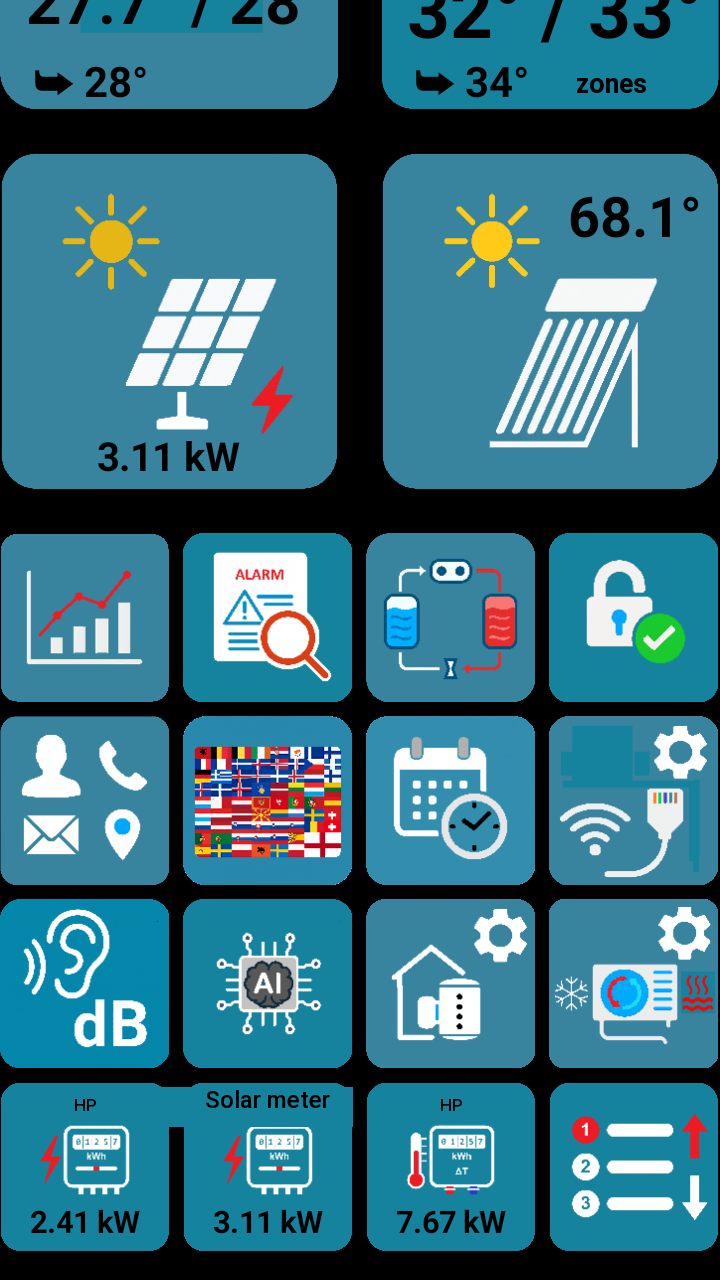
- Priorities: the order in which demands are served is set with a single gesture, with groups of equal priority.
- Quiet mode: a dedicated schedule to limit fan noise at night.
- Contact commands: up to three contacts can impose a setpoint on a function.
The right temperature, at the right time
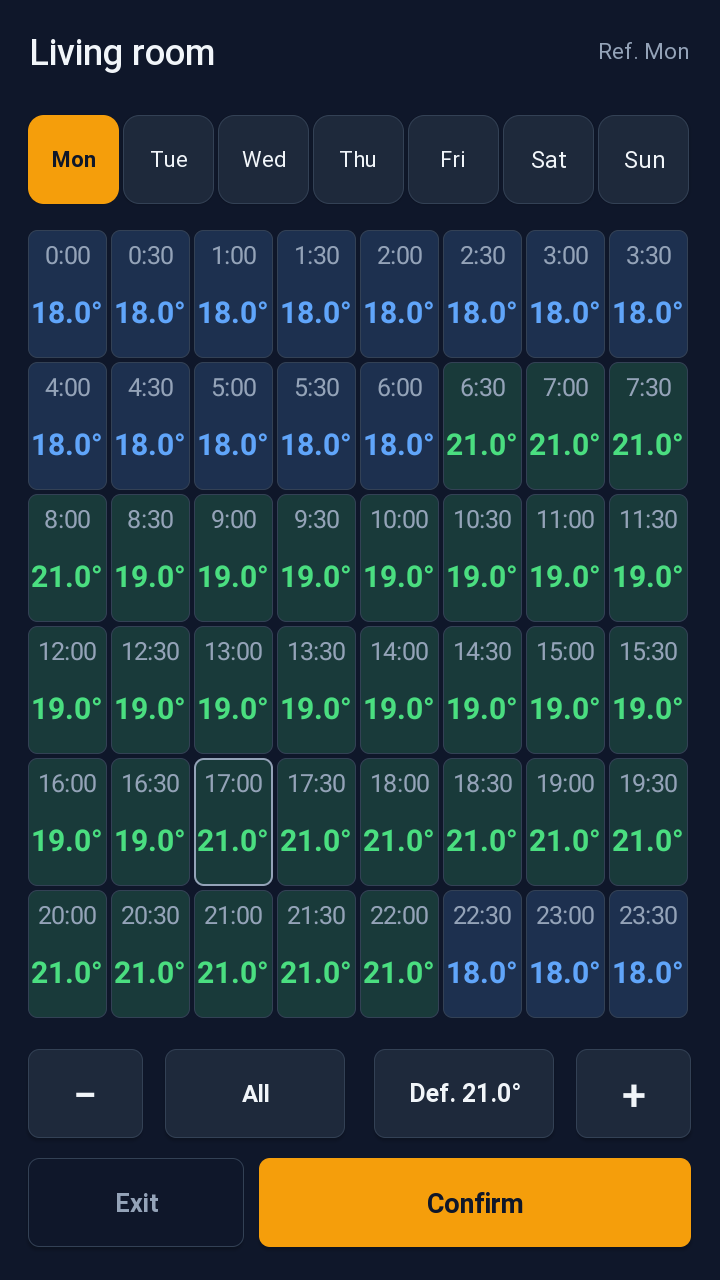
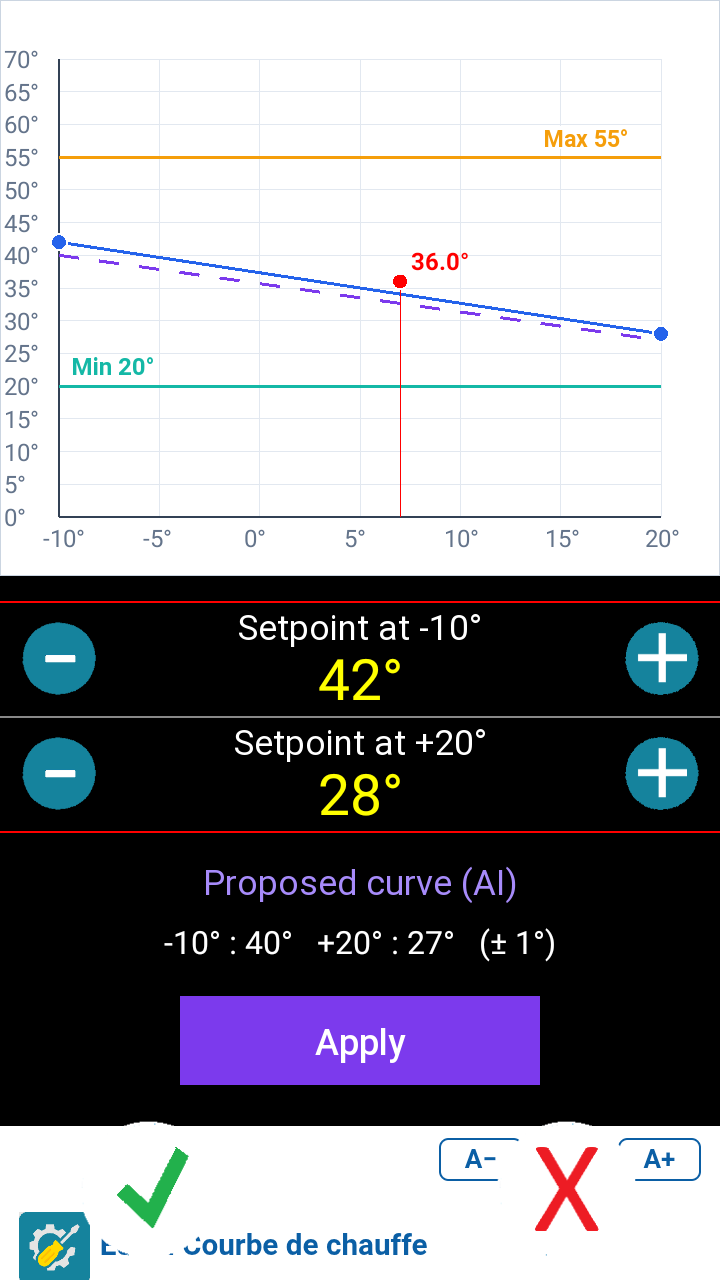
Each function has its own half-hourly schedule and heating curve. The outdoor temperature comes from a sensor or from an Internet weather service, each one backing up the other.
- Half-hourly schedules, day by day, with quick copy and a default value.
- Heating curves that are easy to set: two points, minimum and maximum limits, a clear graph.
- Curve suggested by the AI: the tablet learns the curve that really suits each zone and moves towards it gently, by no more than 1 °C per week.
- Optimum start: with the AI, the house is at temperature at the time set in the schedule, without the schedule being changed.
- Simple to use for the owner: on/off, setpoints and schedules, with no code. Everything else is protected.
Heating when electricity costs less
synapsus knows the home's off-peak and peak hours, and schedules hot water heating and optimum starts for the times when they cost the least, including on the days when electricity is most expensive.
Contract and source
The owner chooses their contract (single rate, off-peak hours or colour-coded days) and where the hours come from: their schedule, the meter's off-peak contact connected by the installer, or 10 pm - 6 am for colour-coded days.
Hot water in off-peak hours
In peak hours, the hot water settles for its economy setpoint, whatever the source of the hours. The owner can also lower the zones, keep the tanks for urgent needs only, the pool for off-peak hours, or fill the tanks and hot water at night.
Savings first
The AI predictions never bring an optimum start forward into peak hours.
Blue, white and red days
With a colour-coded day tariff, synapsus receives the colour of the day and of the next day every day. The owner chooses: during the peak hours of red days (and white days if desired), lower the setpoints, stop the heat pump or do nothing more; the night before, store heat in the tanks and the hot water.
Just the right output, no more, no less
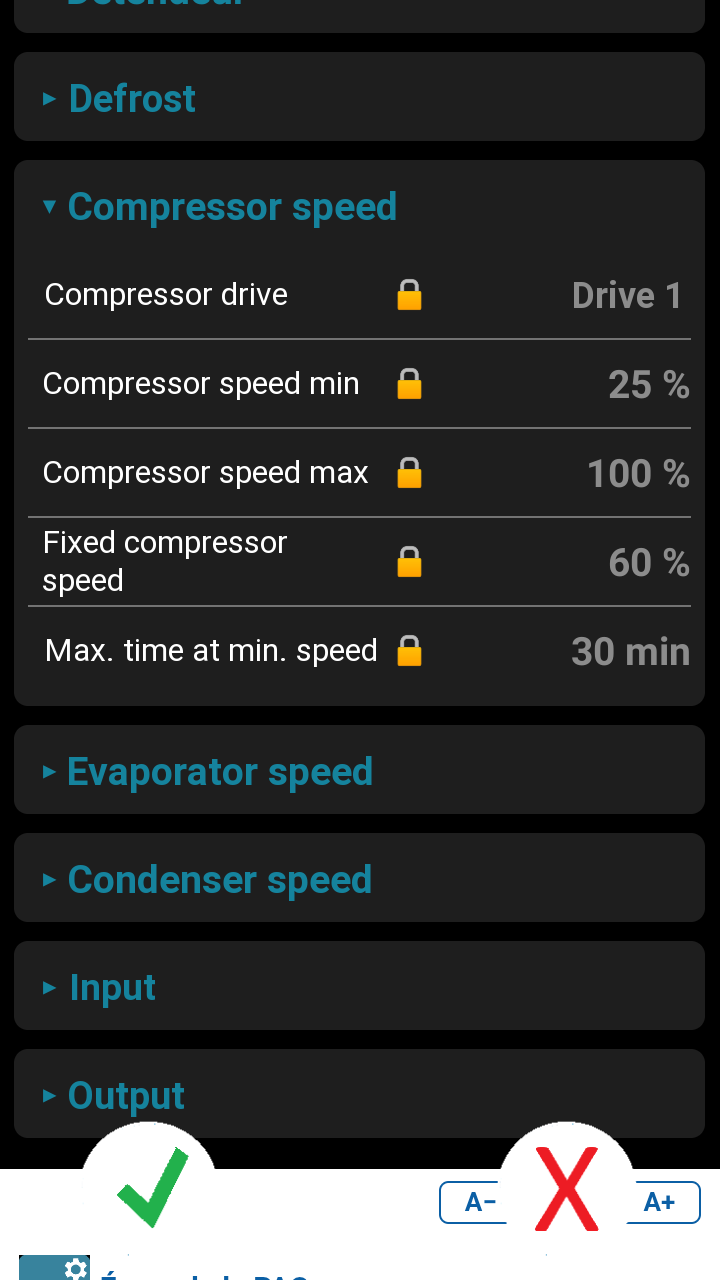
synapsus drives the compressor inverter directly. The speed follows the actual demand instead of cycling on and off at full power.
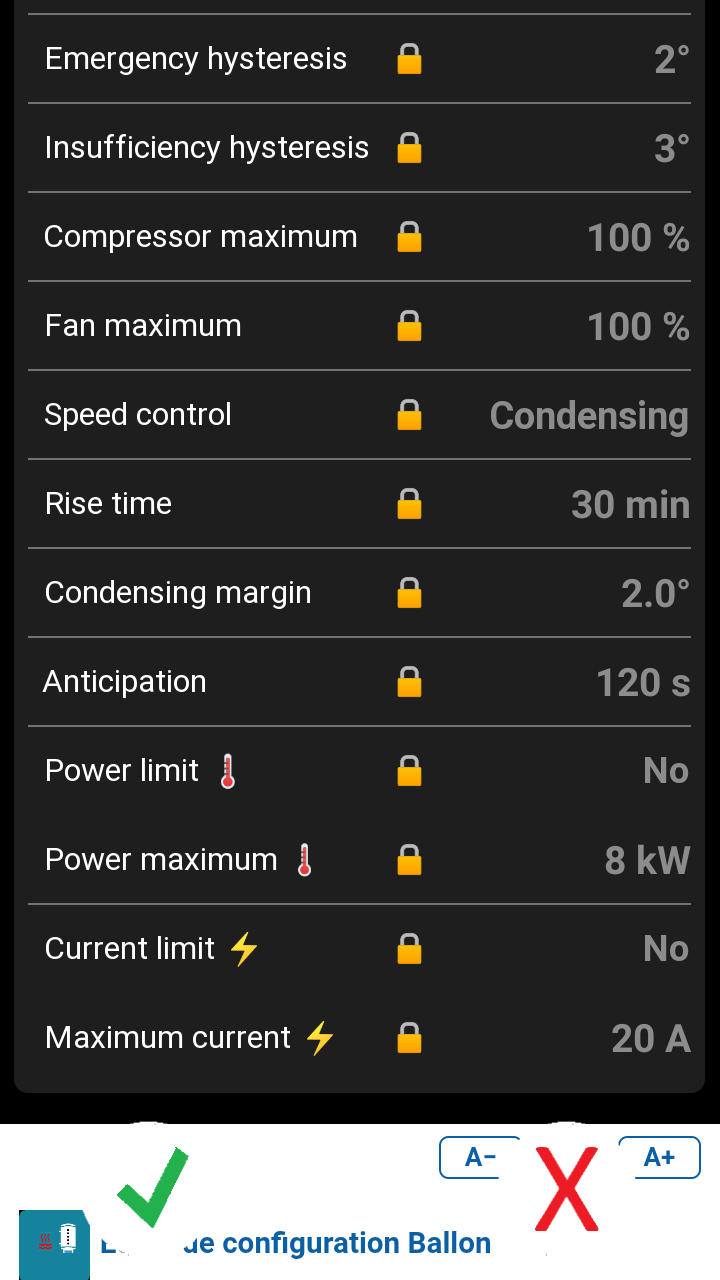
- Condensing mode: the heat pump rises gently towards its maximum temperature to run long, steady cycles, which are better for the compressor.
- Setpoint mode: the heat pump reaches the setpoint within a reasonable time, then slows down to hold it without overshooting.
- Limits respected at all times: maximum heat output, maximum electrical current, condensing temperature.
- Gradual ramp-up: no full-speed start followed by sharp braking.
- Controlled evaporator and condenser: their speed follows their temperature difference, instead of running at a fixed speed.
- Electronic expansion valve control: superheat held at its setpoint, gains learned for each operating condition.
- Safe commissioning: the inverter parameters are checked at every start-up, and its alarms are logged in plain language.
An installation monitored continuously
Every second, the tablet polls its modules and the heat pump. Any deviation is confirmed, logged and handled according to its severity.
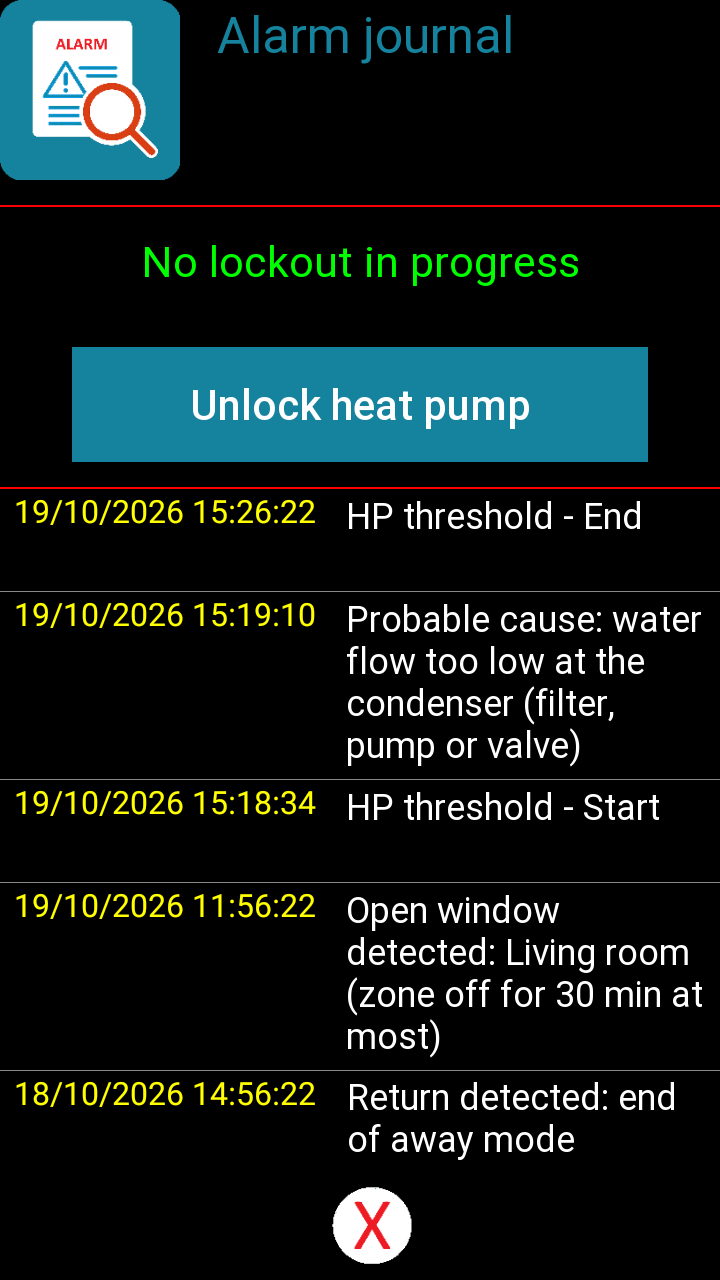
Alarm log
Start and end of each fault, time-stamped, with its probable cause suggested by the AI. The heat pump is stopped or locked out depending on severity, with an adjustable number of retries.
Communication
A module that stops responding is reported immediately. The port is reopened automatically and the heat pump is put into a safe state.
Energy
Electricity consumed and energy produced, per day and per month, for the heat pump and the functions, with up to 10 meters of each type.
Refrigerant circuit
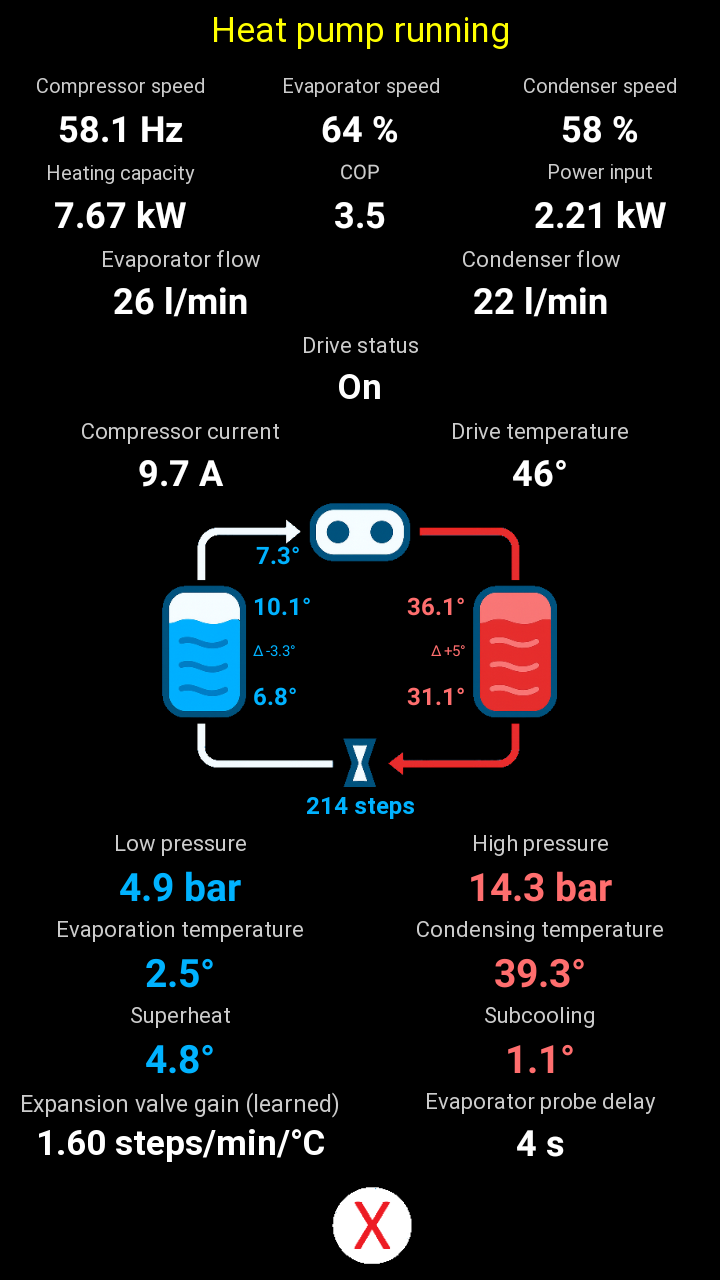
Pressures, temperatures, superheat, subcooling, speeds, heat output and COP on a clear diagram, reversed in cooling mode.
Faulty sensor
Detected at once, written to the alarm log and flagged on the home screen. A tank or the hot water carries on with its other sensor, a zone follows its heating curve, and a heat pump sensor does not stop the heat pump: the home stays heated.
No weather, no outdoor sensor
The last valid outdoor temperature is still used for 24 hours. After that, synapsus takes a fallback temperature based on the season, and control carries on.
Simple for the occupant, complete for the professional
Access levels protect the settings. The occupant sees only what concerns them; the installer and the manufacturer reach their parameters with a code.
Every screen has its own built-in help page, in the tablet's language, simplified for the owner, with adjustable text size, and an assistant answers questions asked in everyday words.
| Level | What it allows |
|---|---|
| Owner | Switching functions on and off, setpoints, schedules, off-peak hours. No code. |
| Installer | Commissioning: sensors, outputs, curves, priorities, heat pump settings, AI functions. |
| Manufacturer | Machine settings: compressor, evaporator, condenser, output, manufacturer parameters. |
Open to the BMS, without compromising on safety
The tablet connects to the building management system (BMS) over the local network, using Modbus TCP. The integrator can read the full state of the installation and, if authorised, send a few simple commands.
Full status, read-only
System, heat pump, alarms, functions, inputs and outputs, updated continuously.
Limited commands
On/off, setpoints within limits, heat pump unlocking. Disabled by default, restricted to a single address if needed, and each one recorded in the log.
Easy to integrate
The tablet can be found by its name on the network, with an adjustable port. The register map is supplied in 7 languages, as a table and as a readable page.
One heat pump first, the others as back-up
Several heat pumps, each with its own tablet, share the same tank, hot water or swimming pool. The master tablet only engages as many heat pumps as needed; each heat pump keeps its own control and its own setpoint.
Less noise
The heat pumps start in quiet mode and only speed up when heat is really lacking.
Shared wear
The heat pump that has run the least starts first; starts are spaced out to avoid current peaks.
On the local network
No Internet needed. If a heat pump or the link stops, the others carry on, and each tablet restarts on its own if needed.
Built into the tablet application; on-site trials begin with the first installations.
With a generator already in place
synapsus can also drive a generator that keeps its own control: a heat pump or a boiler. Its circuit stays its own; synapsus takes care of everything else.
On, off and mode
An on/off contact for the demand, an output for heating or cooling mode.
Its alarm monitored
When it faults, its alarm contact cuts the demand and the fault goes into the alarm log.
Everything else by synapsus
Zones, tanks, hot water, pool, priorities, calendars, off-peak hours and the home's AI: heating curves, optimum starts, hot water that follows your habits.
Built into the tablet application; on-site trials begin with the first installations.
What makes the difference
Solar energy
Solar thermal heats first, and surplus photovoltaic power is stored as heat instead of being sold back at a loss, and the AI takes the forecast sunshine into account.
Find out more →Artificial intelligence
15 functions: heating curves, optimum start, hot water, expansion valve, open window, absence, predictive maintenance, alarm diagnosis…
Find out more →Remote access
synapsus connect: monitor and adjust the installation from a simple website, with alerts, backups and remote updates, without opening anything at the customer's premises.
Find out more →Control designed for today's heat pumps
Variable speed, multi-function, solar energy, off-peak hours, remote monitoring, and an artificial intelligence that improves with every installation. Let's talk about your project.
Contact us